Page 1 of 3
[Solved] Events, buttons etc...
Posted: Sun Sep 13, 2015 21:26
by Tonyx97
Hey guys! I've been doing my own GUI library to organize CEGUI on my engine and I'm trying to create buttons with events (also checkboxes etc...) I tried several stuff I found on Internet but I couldn't make it works... Here is my Button function:
Code: Select all
CEGUI::Window* GUI_t::CButton(CEGUI::String text, float x, float y, float sx, float sy)
{
   CEGUI::Window* button = CEGUI::WindowManager::getSingleton().createWindow("TaharezLook/Button", "Button_" + ToString(TButtons) + "");
   Root->addChild(button);
   button->setPosition(CEGUI::UVector2(CEGUI::UDim(x / 1300, 0.0f), CEGUI::UDim(y / 900, 0.0f)));
   button->setSize(CEGUI::USize(CEGUI::UDim(sx / 1300, 0.0f), CEGUI::UDim(sy / 900, 0.0f)));
   button->setText(text);
   Buttons[TButtons] = button;
   TButtons++;
   button->subscribeEvent(CEGUI::PushButton::EventClicked, CEGUI::Event::Subscriber(&GUI_t::Clicked, this));
   return button;
}
and the main GUI class:
Code: Select all
class GUI_t
{
   public:

      bool Initialized = false;
      void OnClientRender();  ///MTA Style FTW

      CEGUI::Window* Root;
      ///MAIN FUNCTIONS

      CEGUI::Window* CWindow(CEGUI::String text, float x, float y, float sx, float sy);
      CEGUI::Window* CButton(CEGUI::String text, float x, float y, float sx, float sy);
      CEGUI::Window* CLabel(CEGUI::String text, float x, float y, float sx, float sy);
      CEGUI::Window* CCheckBox(CEGUI::String text, float x, float y, float sx, float sy);

   private:
      bool Clicked(const CEGUI::EventArgs& args)
      {
         cout << ":D" << endl;
         return false;
      }
};
When I try to click it doesn't do anything due to I don't know how to inject the input such us keys and mouse click events, I tried this too:
Code: Select all
button->getGUIContext().injectMouseButtonClick(CEGUI::MouseButton::LeftButton); but nothing, any idea how could I do this? Thanks in advance.
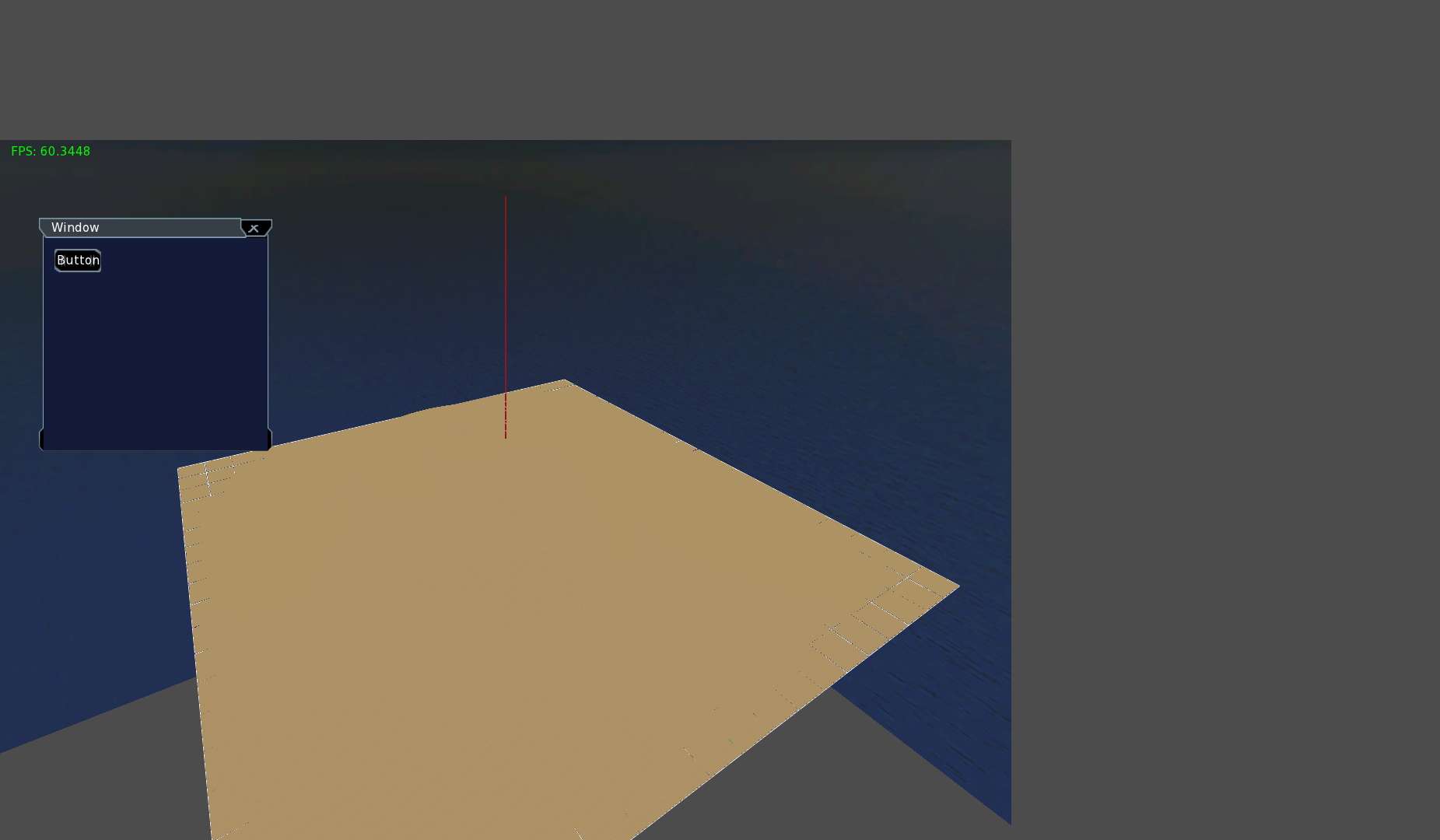
One more question, how can I refresh the OpenGL Renderer because I need that when I set my engine on fullscreen, when I try to set it in fullscreen happened this:
Re: Events, buttons etc...
Posted: Mon Sep 14, 2015 20:14
by Ident
Read the API docs and look at the application templates (!) and the samples of the samplebrowser.
Re: Events, buttons etc...
Posted: Tue Sep 15, 2015 15:16
by Tonyx97
Okey, I got everything work now except a problem that I'd like to solve before continue scripting my classes. So, I create 1 gridlist (listbox) and then I use my code to detect which element in listbox is selected, everything works fine. Now the problem appears when I create 2 listbox, the click event will execute only with the last listbox, if I try to click on the first listbox the program crashes... Here's my code:
Listbox Create Function:
Code: Select all
Gridlist Gridlist::CGridlist(float x, float y, float sx, float sy, CEGUI::Window* parent)
{
   CEGUI::Window* gridList = CEGUI::WindowManager::getSingleton().createWindow("TaharezLook/ItemListbox", "Gridlist_" + ToString(ID) + "");
   if (parent != NULL)
   {
      parent->addChild(gridList);
      gridList->setPosition(CEGUI::UVector2(CEGUI::UDim(x / (parent->getSize().d_width.d_scale * 1300), 0.0f), CEGUI::UDim(y / (parent->getSize().d_height.d_scale * 900), 0.0f)));
      gridList->setSize(CEGUI::USize(CEGUI::UDim(sx / (parent->getSize().d_width.d_scale * 1300), 0.0f), CEGUI::UDim(sy / (parent->getSize().d_height.d_scale * 900), 0.0f)));
   }
   else
   {
      GUI.Root->addChild(gridList);
      gridList->setPosition(CEGUI::UVector2(CEGUI::UDim(x / 1300, 0.0f), CEGUI::UDim(y / 900, 0.0f)));
      gridList->setSize(CEGUI::USize(CEGUI::UDim(sx / 1300, 0.0f), CEGUI::UDim(sy / 900, 0.0f)));
   }
   CWindow = gridList;
   CListbox = static_cast<CEGUI::ItemListbox*>(CWindow);
   cout << CListbox << endl;
   CListbox->subscribeEvent(CEGUI::ItemListbox::EventMouseDoubleClick, CEGUI::Event::Subscriber(&Gridlist::OnClick, this));
   ID++;
   return *this;
}
and this is the classes I use to create grid etc..
Code: Select all
class Gridlist
{
   private:
      bool OnClick(const CEGUI::EventArgs& args)
      {
         CEGUI::String ItemName = CListbox->getFirstSelectedItem()->getText();
         cout << "Gridlist: " << CListbox << " - Clicked Item: " << ItemName << endl;

         return false;
      }
   public:
      int ID;
      CEGUI::Window* CWindow;
      CEGUI::ItemListbox* CListbox;    ///CWindow Converted to ListBox (CEGUI)
      vector<CEGUI::String> Items;

      Gridlist CGridlist(float x, float y, float sx, float sy, CEGUI::Window* parent);
      void AddItem(CEGUI::String itemText)
      {
         CEGUI::Window* item = CEGUI::WindowManager::getSingleton().createWindow("TaharezLook/ListboxItem", "Item_" + ToString(Items.size()));
         item->setPosition(CEGUI::UVector2(CEGUI::UDim(0.0f, 0.0f), CEGUI::UDim(Items.size() * 30.0f, 0.0f)));
         item->setSize(CEGUI::USize(CEGUI::UDim(CWindow->getSize().d_width.d_scale * 1300, 0.0f), CEGUI::UDim(CEGUI::UDim(30.0f, 0.0f))));
         item->setText(itemText);
         CWindow->addChild(item);
         CListbox->addItem(static_cast<CEGUI::ItemEntry*>(item));
         Items.push_back(itemText);                                                   ///ADDING NEW ITEM TO GRIDLIST
      }
};


class GUI_t : public Gridlist
{
   public:

      bool Initialized = false;
      void OnClientRender();

      CEGUI::Window* Root;
      ///MAIN FUNCTIONS

      CEGUI::Window* CWindow(CEGUI::String text, float x, float y, float sx, float sy, Color color, CEGUI::String font, CEGUI::Window* parent);
      CEGUI::Window* CButton(CEGUI::String text, float x, float y, float sx, float sy, Color color, CEGUI::String font, CEGUI::Window* parent);
      CEGUI::Window* CLabel(CEGUI::String text, float x, float y, float sx, float sy, Color color, CEGUI::String font, CEGUI::String horzAlign, CEGUI::String vertAlign, CEGUI::Window* parent);
      CEGUI::Window* CCheckBox(CEGUI::String text, float x, float y, float sx, float sy, Color color, CEGUI::String font, CEGUI::Window* parent);
      CEGUI::Window* CProgressBar(float x, float y, float sx, float sy, Color color, float progress, CEGUI::Window* parent);


   private:
      bool Event_Clicked (const CEGUI::EventArgs& args)
      {
         cout << "Button Clicked: " << args.handled << endl;
         return false;
      }
      bool Event_CheckBox(const CEGUI::EventArgs& args)
      {
         cout << "Checkbox Clicked: " << args.handled << endl;
         return false;
      }
};
I use this to create the grids:
Code: Select all
   Gridlist grid = GUI.CGridlist(170, 160, 100, 130, Windows[0]);
   grid.AddItem("Item 1");
   grid.AddItem("Item 2");
   grid.AddItem("Item 3");
   grid.AddItem("Item 4");
   grid.AddItem("Item 5");
   grid.AddItem("Item 6");

   Gridlist grid2 = GUI.CGridlist(50, 200, 100, 130, Windows[0]);
   grid2.AddItem("Other 1");
   grid2.AddItem("Other 2");
   grid2.AddItem("Other 3");
It is supposed to add 2 events to each listbox but no, it only works with the last listbox created. Obviously I want to create many classes as GUI elements there are, buttons, checkboxes... So I need this to work. I don't know why this happens... Any idea how to do this correctly?
Re: Events, buttons etc...
Posted: Tue Sep 15, 2015 15:41
by lucebac
I did not look into details yet but event handlers have to return "true" if the event got handled. You return false.
Re: Events, buttons etc...
Posted: Tue Sep 15, 2015 15:49
by Ident
Starting with 0.8.5 you can also subscribe to event handlers without return value. This is basically the equivalent to returning false.
Returning true can change the way the widget itself internally handles the event, lucebac is entirely correct about his remark.
Re: Events, buttons etc...
Posted: Tue Sep 15, 2015 16:45
by Tonyx97
It doesn't make any new, I think I didn't explain myself properly. I'll explain with some Screenshots. First I have 2 listboxes
https://gyazo.com/2e09a86a19c934ec1688f493902909e2, then I double click on 1 item of the SECOND grid which is this
https://gyazo.com/bccae8795f0d734b80b459c04893ec37 and after that I click in the FIRST listbox and the console gives me the same handler executed by the 2nd listboxes, as you can see in the output Listboxes are the same (05DDECC8) that's because both listboxes uses same handler function which is: You also can see the real listboxes output after the msg "Skybox Loaded!".
Edit: If I try to click on the FIRST listbox the program crashs totally. The only thing why should be happening this is because the 2nd listbox subscribeEvent replace the first, but I'm not sure.
Code: Select all
      bool OnClick(const CEGUI::EventArgs& args)
      {
         CEGUI::String ItemName = CListbox->getFirstSelectedItem()->getText();
         cout << "Gridlist: " << CListbox << " - Clicked Item: " << ItemName << endl;
         return true;
      }
Re: Events, buttons etc...
Posted: Wed Sep 16, 2015 19:40
by Tonyx97
Any help guys please?
Re: Events, buttons etc...
Posted: Wed Sep 16, 2015 19:42
by lucebac
CEGUI log?
Re: Events, buttons etc...
Posted: Wed Sep 16, 2015 19:57
by Tonyx97
Re: Events, buttons etc...
Posted: Wed Sep 16, 2015 20:04
by Ident
You can register as many widgets as you want for one and the same handler. This has been done before many times successfully, and I have done it too, so I can assure you this works perfectly fine

Your log does not show any "crash" related info. Mind to give us the callstack or whatever info you can give us about your "crash" whatever a "crash" in this case is.
I think something else was done wrong here.
Also:
Doesn't this look dangerous? You use it for "onClick". What if the click didnt trigger a selection? It would be preferrable to check if this function returns a valid pointer or a null pointer. Try it please. See if it changes anything.
Your explanation regarding the "05DDECC8" was confusing. What exactly is 05DDECC8? The memory adress of..? You say both listboxes are the same? How can that be, there are two widgets shown. So what is the output on the console and what is "05DDECC8" and please refer to the listboxes by "left" and "right" one or similar because I didnt understand your otherwise quite good description.
Re: Events, buttons etc...
Posted: Wed Sep 16, 2015 20:37
by Tonyx97
Sorry for my explanation, is not good at all. If you say it'd work I don't know what is going on in my code. I'll do it better. First I think you didn't check my code well because I only call "OnClick" function when mouse double clicks on the Listbox like this:
Code: Select all
CListbox = static_cast<CEGUI::ItemListbox*>(CWindow);
CListbox->subscribeEvent(CEGUI::ItemListbox::EventMouseDoubleClick, CEGUI::Event::Subscriber(&Gridlist::OnClick, this));
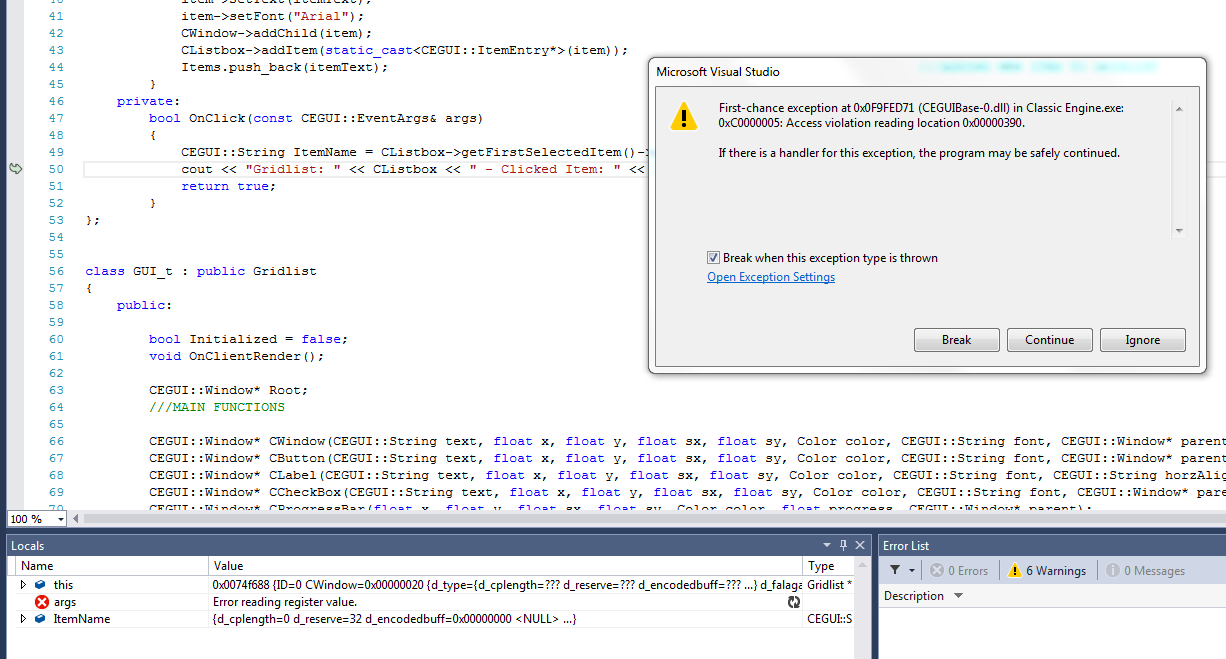
This call the function when I click on item from Listbox. Now I'll explain the crash. When I start my engine everything render ok, now I double click on the RIGHT Listbox and the engine crashs with this error:
https://i.gyazo.com/01566a527e3fe5d9758 ... 251ea0.png . Second case, when I start engine and I click on the LEFT Listbox it works and the output is correct as you can see in this picture
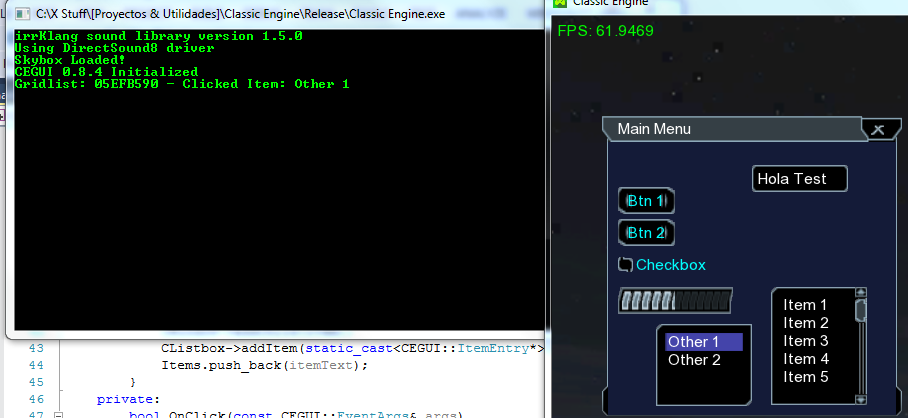
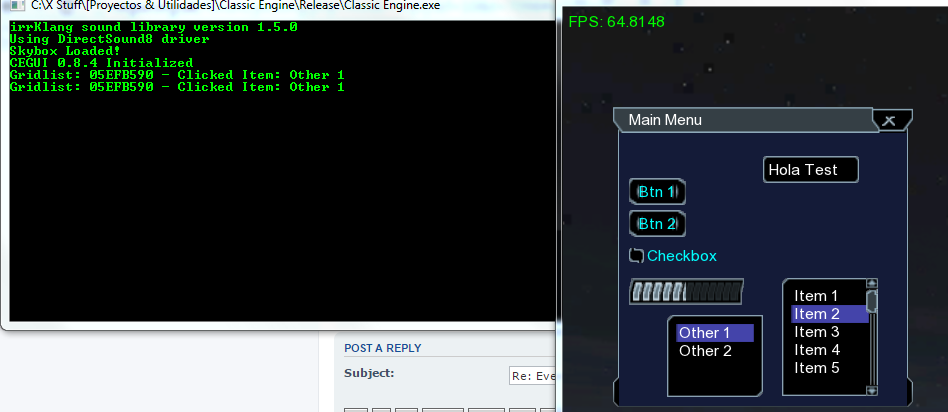
https://i.gyazo.com/c34631733cd356cafdb ... e835f3.png now I'll click on the RIGHT Listbox and happens this
https://i.gyazo.com/2cd14d6bb5b69c106d1 ... 2eaebe.png it gives me the same output as the LEFT Listbox, there is no sense... I use cout<<CEGUI::Listbox*<<endl; to check which Listbox I clicked and when I click on the LEFT and after that on the RIGHT the Listbox output is the same (05EFB590), this address is the result of outputing a CEGUI::Listbox* element directly.
Re: Events, buttons etc...
Posted: Wed Sep 16, 2015 21:10
by Ident
Did you try what I said regarding the returned pointer?
Re: Events, buttons etc...
Posted: Thu Sep 17, 2015 06:09
by Tonyx97
I changed what you said to this:
Code: Select all
      bool OnClick(const CEGUI::EventArgs& args)
      {
         if (CListbox->getFirstSelectedItem() == NULL) { cout << "FAIL" << endl; return false; }
         CEGUI::String ItemName = CListbox->getFirstSelectedItem()->getText();
         cout << "Gridlist: " << CListbox << " - Clicked Item: " << ItemName << endl;
         return true;
      }
Now when I start the engine and I click directly in the RIGHT Listbox I receive FAIL instead of the engine crash, this mean there is no handler for the RIGHT Listbox or something like that, I'm not sure, what do you think?
Re: Events, buttons etc...
Posted: Thu Sep 17, 2015 20:47
by Ident
Honestly I am starting to get slightly annoyed: I cant help you if you keep telling us you get a crash without any information what the heck this mean. It is ridiculous to say it was a "crash". There is many reasons your application might stop or exit and we cant help you and personally I dont feel like helping you if you cant bring up the effort to post a callstack or AT LEAST the error. Please read this again, I just updated the guidelines for greater clarity:
viewtopic.php?f=10&t=3351
Re: Events, buttons etc...
Posted: Thu Sep 17, 2015 21:49
by Tonyx97
I already posted a picture of the error when it crashes upper... I don't know what information can I provide more, I'm just giving you what I see. I'm efforting to give stuff I can see, tell me if you need somethig more and specify me where to get the info you need...